


Introduction
According to PIKOM, as organisations modernise their IT environments, cybersecurity is no longer just about protecting endpoints or email. Greater reliance on cloud services, identities, and connected systems means organisations need visibility across their entire digital ecosystem, not just individual devices.
This shift has made choosing between XDR vs EDR more important than ever. Although both solutions improve threat detection and response, they are built to address different security needs. This guide explores their differences, when each solution makes sense, and how Managed EDR can strengthen your organisation’s cybersecurity.
What is EDR?

Endpoint Detection and Response (EDR) is a cybersecurity solution that continuously monitors endpoint devices for suspicious activity, helping security teams detect, investigate, and respond to cyber threats.
An endpoint is any physical or virtual device connected to a network, such as a laptop, desktop, server, virtual machine, or mobile device.
Key Capabilities of EDR
- Continuous monitoring: Continuously tracks activity on endpoint devices, including running programs, network traffic, file transfers, system changes, and user behaviour, to identify suspicious activity in real time.
- Threat detection: Detects malware, ransomware, credential theft, and other malicious activity using behavioural analysis, threat intelligence, machine learning, and indicators of compromise (IOCs) or indicators of attack (IOAs).
- Threat investigation: Provides detailed insights into how an attack started, the vulnerability or weakness that was exploited, the actions performed by the attacker, and the systems affected.
- Incident response: Enables security teams to quickly contain threats by isolating compromised devices, terminating malicious processes, removing malware, and automating response actions using predefined rules and machine learning.
- Threat remediation: Helps restore affected systems, apply security updates, address exploited vulnerabilities, and update detection rules to prevent similar attacks in the future.
- Threat hunting: Allows security analysts to proactively investigate endpoint activity and uncover hidden or stealthy threats that automated security tools may have missed.
How Does EDR Work?
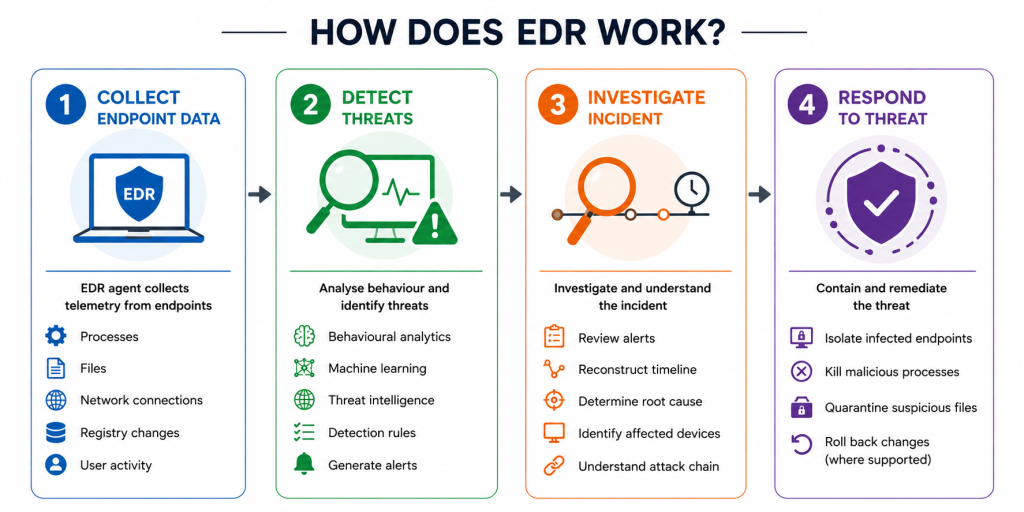
1. Collect endpoint activity
The EDR agent continuously collects telemetry (security-related activity and event data) from endpoints, including running processes, user activity, network connections, file changes, and registry modifications.
This is typically done by deploying a lightweight agent on each endpoint device, although some EDR solutions rely on built-in operating system capabilities instead.
2. Analyse behaviour and detect threats
EDR continuously analyses endpoint activity to build a picture of normal behaviour. By combining behavioural analytics, machine learning, threat intelligence, detection rules, and contextual understanding, it can identify suspicious activity that stands out from normal operations.
When potential threats, such as ransomware or credential theft, are detected, the platform automatically generates an alert for investigation. This allows security teams to respond quickly before the threat can spread or cause further damage.
3. Investigate the incident
Security analysts review the alert and reconstruct the attack timeline to understand how the incident unfolded. This helps them trace the sequence of events leading up to the attack.
They can then identify affected devices, determine the root cause, and understand the attack’s execution chain, enabling a faster and more effective response while reducing the risk of similar incidents.
4. Respond to the threat
Depending on the severity of the incident, the security team may:
- Isolate infected endpoints
- Kill malicious processes
- Remove malware
- Quarantine suspicious files
- Roll back malicious changes where supported
By responding quickly, organisations can minimise the impact of an attack while using the findings to strengthen future threat detection and security measures.
Common Use Cases for EDR

- Detecting ransomware: Identifies abnormal file encryption behaviour and helps contain ransomware before it spreads across the network.
- Stopping malware infections: Detects malicious software that may bypass traditional antivirus solutions.
- Investigating security incidents: Provides detailed forensic information that helps security teams understand how an attack occurred.
- Supporting compliance: Maintains endpoint activity logs and security records that support compliance with standards such as ISO/IEC 27001, PCI DSS, HIPAA, and GDPR.
- Protecting remote workers: Monitors laptops and other endpoints regardless of whether employees are working from the office or remotely.
Pros of EDR
- Provides continuous endpoint visibility: Continuously monitors endpoint activity to detect and investigate threats as they happen.
- Detects advanced threats using behavioural analysis: Instead of relying solely on known malware signatures, EDR uses behavioural analysis, threat intelligence, and machine learning to detect advanced attacks
- Enables rapid investigation and response: Security teams can quickly investigate incidents, trace attack timelines, and contain threats before they spread across the environment.
- Automates threat detection and response: Many EDR solutions can automatically isolate infected devices, quarantine malicious files, terminate harmful processes, or trigger predefined response actions, reducing response times and limiting potential damage.
- Helps reduce the impact of ransomware and malware attacks: By detecting malicious activity early and enabling quick containment, EDR can minimise the disruption and damage caused by cyberattacks.
Cons of EDR
- Limited visibility beyond endpoints: EDR focuses primarily on endpoint devices and offers limited visibility into other environments, such as email, cloud applications, identities, and network traffic.
- May require additional security solutions: To achieve broader threat detection across multiple environments, organisations often need to integrate EDR with tools such as SIEM, SOAR, or XDR.
- Can generate a high volume of alerts: Without proper tuning, EDR may produce numerous alerts, making it more difficult for security teams to identify genuine threats.
- Requires ongoing monitoring and expertise: Although many EDR platforms include automation, skilled analysts are still needed to investigate alerts, validate threats, and respond effectively to complex incidents.
What is XDR?

Extended Detection and Response (XDR) builds on the capabilities of EDR by collecting and correlating security data from multiple sources, rather than focusing only on endpoint devices.
In addition to endpoints, XDR can monitor:
- Endpoint devices
- Identity and access management (IAM)
- Network traffic
- Cloud workloads
- Servers
- Security tools, such as firewalls and SIEM platforms
By connecting data across these environments, XDR provides a broader view of an attack and helps security teams detect threats that may be missed when analysing endpoints alone.
Key Capabilities of XDR
- Cross-platform visibility: Collects and analyses telemetry from multiple sources to eliminate data silos, where security data is isolated across multiple tools, giving security teams a unified view of their environment.
- Threat correlation: Uses machine learning, AI, and threat intelligence to connect seemingly unrelated alerts across multiple systems, helping identify complex, multi-stage attacks and present them as a single incident.
- Automated investigation and response: Automatically connects related alerts and responds using predefined actions, helping contain threats more quickly.
- Threat hunting: Gives analysts a unified view of security data, enabling them to proactively search for hidden threats across multiple security layers.
How Does XDR Work?
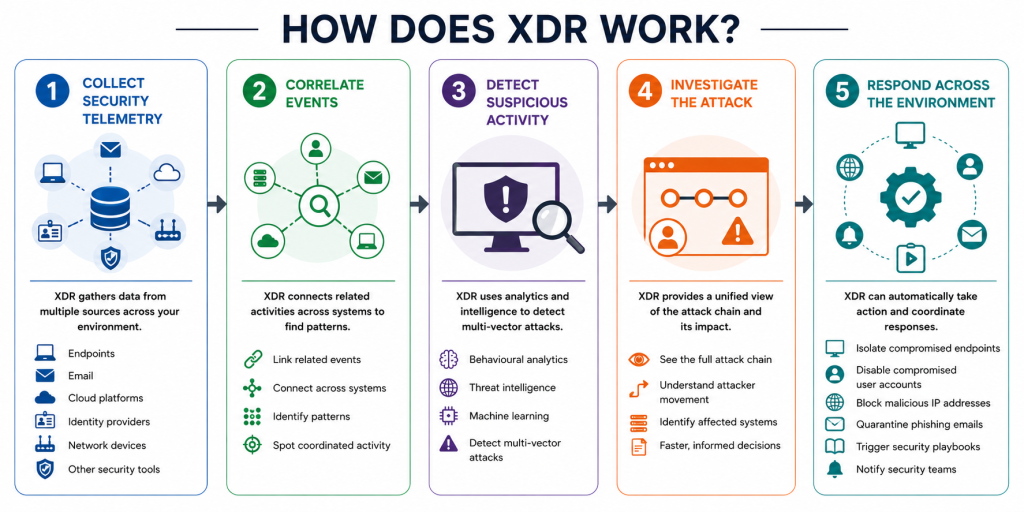
1. Collect security telemetry
XDR gathers data from multiple sources, including endpoints, email, cloud platforms, identity providers, network devices, and other integrated security tools.
2. Correlate events
Instead of treating each alert separately, XDR connects related activities across different systems to identify patterns that may indicate a coordinated attack.
3. Detect suspicious activity
Using behavioural analytics, threat intelligence, and machine learning, XDR identifies attacks that may involve multiple attack vectors, such as phishing emails leading to credential theft and endpoint compromise.
4. Investigate the attack
Security teams receive a unified view of the attack chain, allowing them to understand how the attacker gained access, moved through the environment, and what systems were affected.
5. Respond across the environment
Depending on the platform, XDR can automatically:
- Isolate compromised endpoints
- Disable compromised user accounts
- Block malicious IP addresses
- Quarantine phishing emails
- Trigger security playbooks
- Notify security teams for further investigation
Common Use Cases for XDR

- Stopping ransomware attacks: Detects attacks across email, endpoints, and networks before ransomware spreads throughout the organisation.
- Detecting phishing attacks: Correlates malicious emails with suspicious endpoint behaviour and compromised user accounts.
- Investigating multi-stage attacks: Connects events across different systems to provide a complete picture of how an attacker progressed through the environment.
- Protecting hybrid and cloud environments: Monitors threats affecting cloud applications, remote users, and on-premises infrastructure from a single platform.
Pros of XDR
- Provides broader visibility: Monitors endpoints, cloud environments, email, identities, networks, and other security layers from a single platform.
- Detects cross-environment attacks: Identifies threats that span multiple systems and would be difficult to detect through endpoint monitoring alone.
- Correlates alerts automatically: Combines related alerts into a single incident, providing a clearer view of the attack.
- Automates investigation and response: Speeds up threat detection and containment through automated workflows and response actions.
- Reduces alert fatigue: Prioritises related security events, helping analysts focus on genuine threats instead of isolated alerts.
- Improves security operations: Reduces time spent investigating individual alerts, allowing security efforts to focus on higher-priority threats.
- Reduces long-term operational costs: By improving efficiency and automation, organisations can strengthen security operations without needing to scale security resources as quickly.
Cons of XDR
- Higher implementation costs: Typically costs more than EDR due to broader licensing requirements and platform integrations.
- More complex to deploy: May require additional planning and integration with existing security tools.
- Dependent on integrations: Some capabilities rely on compatible security products and supported data sources.
- Requires security expertise: Organisations may need experienced security personnel or a managed security provider to fully utilise the capabilities of XDR.
- May be unnecessary for some organisations: Businesses with simple IT environments may not need XDR initially.
EDR vs XDR: Similarities
Although EDR and XDR differ in scope, they share the same goal: helping organisations detect, investigate, and respond to cyber threats more effectively.
Both solutions:
- Continuously monitor security activity
- Detect suspicious behaviour using behavioural analytics
- Support threat investigation and incident response
- Help contain malware and ransomware attacks
- Use threat intelligence to identify emerging threats
The main difference is their scope: EDR focuses on endpoint devices, while XDR extends visibility across multiple security layers.
EDR vs XDR: What’s the Difference?
| Feature | EDR | XDR |
| Primary focus | Endpoint devices | Entire IT environment |
| Data sources | Endpoints only | Endpoints, network, cloud, email, identities, servers, and more |
| Threat detection | Endpoint-based | Cross-platform correlation |
| Response | Device level | Coordinated response across multiple systems |
| Visibility | Endpoint activity | Organisation-wide visibility |
| Deployment | Simpler | More comprehensive |
| Best suited for | Organisations focused on endpoint protection | Organisations requiring broader threat detection and response |
This comparison shows that XDR is not designed to replace EDR, but to extend its capabilities by providing a more complete view of modern cyber threats.
How to Choose Between XDR vs EDR
1. Assess Your IT Environment
Start by understanding what you need to protect.
Ask yourself:
- Do you mainly manage endpoint devices?
- Do you have cloud workloads or SaaS applications?
- Are employees working remotely?
- How many different security tools are you currently managing?
Organisations with more complex environments often benefit from the broader visibility that XDR provides.
2. Evaluate Your Security Resources
Both EDR and XDR require ongoing monitoring and investigation.
Consider:
- Do you have an in-house security team?
- Can your IT team investigate security alerts around the clock?
- Do you have a Security Operations Centre (SOC)?
If not, an MSP can help monitor, manage, and respond to EDR or XDR alerts on your behalf. Learn more in our article on What is an MSP Provider.
3. Consider Your Risk Profile
Different industries face different cyber risks.
For example:
- Financial institutions often require broad visibility across multiple systems.
- Healthcare providers must protect sensitive patient data.
- Manufacturers need to secure operational technology alongside corporate networks.
- Small businesses may simply need stronger endpoint protection against ransomware.
Understanding your biggest risks helps determine whether EDR alone is sufficient or whether XDR offers greater value.
4. Review Compliance Requirements
Some regulations and customer requirements expect organisations to demonstrate strong threat detection and incident response capabilities.
If your organisation must comply with standards such as ISO/IEC 27001, PCI DSS, or customer security frameworks, consider whether broader monitoring through XDR better supports your compliance objectives.
When Should You Choose EDR?
EDR may be sufficient if your organisation:
- Primarily needs to protect laptops, desktops, and servers
- Has a relatively simple IT environment
- Already has other security monitoring tools in place
- Is looking for a cost-effective way to strengthen endpoint protection
- Is beginning to build its cybersecurity programme
For many small and medium-sized businesses, EDR provides a significant improvement over traditional antivirus by delivering continuous monitoring and faster incident response.
When Should You Choose XDR?
XDR may be a better fit if your organisation:
- Uses multiple cloud platforms or SaaS applications
- Supports a hybrid or remote workforce
- Has invested in several security tools that operate independently
- Needs better visibility across endpoints, networks, email, and identities
- Wants to reduce alert fatigue through automated correlation and investigation
Rather than replacing EDR, XDR helps organisations connect security events across their entire environment to improve detection and response.
How to Implement EDR and XDR Successfully
Deploying EDR or XDR involves more than installing software. To get the most value from your investment, organisations should take a structured approach.
- Define your objectives: Identify the assets you want to protect, the risks you want to reduce, and the outcomes you expect.
- Deploy strategically: Roll out the solution in phases, starting with critical systems before expanding to the rest of your environment.
- Configure detection policies: Fine-tune detection rules to reduce false positives while ensuring genuine threats are detected.
- Integrate with existing tools: Connect EDR or XDR with firewalls, identity providers, cloud platforms, SIEM solutions, and other security technologies where appropriate.
- Review and improve regularly: Cyber threats continue to evolve, so detection rules, response procedures, and security policies should be reviewed and updated over time.
Why Many Organisations Choose Managed EDR
Deploying EDR is only the first step. To be effective, alerts must be continuously monitored, investigated, and responded to before attackers can escalate an incident.
For many organisations, maintaining this capability internally can be challenging due to limited resources, skills shortages, or the need for 24/7 monitoring. This is where Managed EDR provides additional value.
A Managed EDR service typically includes:
- Continuous monitoring by cybersecurity specialists
- Threat detection and investigation
- Rapid incident response
- Threat hunting
- Ongoing platform optimisation
- Regular reporting and security recommendations
Want a deeper look at how managed detection and response services work? Read our guide on What Is MDR Service in Cyber Security?
Conclusion
Cyber threats will continue to evolve, and so will the tools designed to defend against them. The real advantage isn’t choosing the latest cybersecurity solution. It’s understanding what EDR and XDR each offer and selecting the approach that best fits your organisation’s environment, risks, and security goals.
As an ISO-certified provider of managed IT services, we’re here to help you strengthen your cybersecurity with EDR, XDR, and Managed EDR solutions tailored to your business. Whether you’re enhancing endpoint security or expanding your threat detection capabilities, contact us today to get started.
Frequently Asked Questions
1. Which is better for small businesses, EDR or XDR?
For many small and medium-sized businesses, EDR is often the better starting point. It provides continuous endpoint monitoring, threat detection, and incident response without the complexity or cost of a full XDR deployment.
However, if your business relies heavily on cloud services, supports remote employees, or manages multiple security tools, XDR may provide greater value by offering visibility across your entire IT environment. The right choice ultimately depends on your infrastructure, risk profile, and available security resources.
2. Why did XDR evolve from EDR?
As organisations adopted more cloud-based technologies and security tools, security teams needed broader visibility to detect and investigate attacks more effectively.
XDR was developed to address this challenge by bringing together security data from multiple sources into a single platform. Rather than replacing EDR, it builds on its capabilities to provide a more complete view of threats across the IT environment.
3. Can XDR integrate with existing EDR solutions?
Yes. Many XDR platforms are designed to integrate with existing EDR solutions, allowing organisations to build on their current security investments rather than replacing them entirely.
Depending on the platform, XDR may also integrate with firewalls, SIEM solutions, cloud services, identity providers, email security platforms, and other security tools to provide broader visibility and faster threat detection.
4. Do you need EDR if you have XDR?
In most cases, yes. Since endpoint devices remain one of the most common entry points for cyber attacks, endpoint visibility continues to play a critical role in threat detection.
Many XDR platforms either include native EDR capabilities or integrate with an existing EDR solution to collect endpoint telemetry. Without endpoint data, XDR would have an incomplete view of your security environment.
5. Is Managed EDR worth it?
For organisations without a dedicated cybersecurity team, Managed EDR can be a cost-effective way to strengthen security without hiring additional in-house specialists.
Instead of simply receiving alerts, you’ll have experienced security analysts monitoring your environment, investigating suspicious activity, and responding to threats on your behalf. This enables organisations to improve their security posture while reducing the burden on internal IT teams.
6. What’s the difference between EDR, MDR, and XDR?
Although they’re closely related, EDR, MDR, and XDR serve different purposes.
| Solution | Primary Function |
| EDR | A security technology that detects and responds to threats on endpoint devices. |
| XDR | A security platform that extends detection and response beyond endpoints by correlating data across email, cloud, identities, networks, and other security tools. |
| MDR (Managed Detection and Response) | A managed service where cybersecurity experts monitor, investigate, and respond to threats using technologies such as EDR and XDR. |
If you’d like to learn more about how managed detection works, read our guide on What Is MDR Service in Cyber Security?
7. Can EDR and XDR work together?
Yes. XDR is designed to complement EDR, not replace it. It combines endpoint data from EDR with information from email, cloud environments, identities, networks, and other security tools to provide a more complete view of an attack.
Together, EDR and XDR give organisations broader visibility, faster threat detection, and more effective incident response.